
Self-hosting essentials
What you actually need to know to run an open-weight model competently: vLLM as the default server, KV cache as the resource constraint, continuous batching, and how to size GPUs before you spend.
You have a Llama 3.3 70B model and two A100-80GB GPUs. Your boss wants to know if it'll fit. The model weights are 140 GB in BF16, which obviously doesn't fit on one 80 GB card. With tensor parallelism splitting the weights across both GPUs, that's 70 GB per card. Sounds tight, sounds workable.
It isn't workable, and the reason is the KV cache.
This chapter is the operations menu for running an open-weight model competently. Not the kernel internals. Not the GPU architecture. The four things you actually need to know to size hardware, start a server, and not have it fall over: vLLM, the KV cache, continuous batching, and the back-of-envelope math that decides how many GPUs you rent.
vLLM is the default#
For self-hosted open-weight models on NVIDIA GPUs, vLLM is the answer. Originally built at UC Berkeley, it now has 2,000+ contributors and runs in production at Meta, Stripe, Cohere, and Mistral.[1] Stripe migrated 50 million daily API calls from HuggingFace Transformers to vLLM in December 2025 and reported a 73% inference cost reduction on one-third of their prior GPU fleet.[1:1]
The reason it became the default isn't aggressive kernel fusion. TensorRT-LLM beats vLLM by 10-30% on raw NVIDIA throughput when you can afford the per-model compilation step. vLLM wins on hardware breadth (NVIDIA, AMD ROCm, AWS Trainium, Apple Silicon), model breadth (200+ HuggingFace architectures), and the fact that it speaks the OpenAI API natively.
That last point matters more than it sounds. Your application code doesn't change.
from openai import OpenAI

# Same client. Different base_url.
client = OpenAI(api_key="EMPTY", base_url="http://localhost:8000/v1")

response = client.chat.completions.create(
    model="meta-llama/Llama-3.3-70B-Instruct",
    messages=[{"role": "user", "content": "Hello"}],
    max_tokens=256,
)
Starting the server is one command:[2]
# Single GPU
vllm serve meta-llama/Llama-3.1-8B-Instruct

# Multi-GPU tensor parallel for a 70B model
vllm serve meta-llama/Llama-3.3-70B-Instruct \
  --tensor-parallel-size 4 \
  --gpu-memory-utilization 0.90 \
  --max-model-len 8192
Three flags do most of the work. --tensor-parallel-size splits weights across N GPUs in the same node. --gpu-memory-utilization (default 0.9) is the fraction of VRAM vLLM gets to play with; setting it to 1.0 will OOM during CUDA graph capture, so don't. --max-model-len caps the context window. That last flag is the most important one in this entire chapter, and the next two sections explain why.
The KV cache is the hidden cost#
When a transformer generates token N+1, it computes attention against every prior token in the sequence. The keys and values for those prior tokens get cached so they don't have to be recomputed each step. Without the cache, generation cost would be O(n^2) in token count. With it, each step is roughly constant, and the cache grows linearly.
The exact memory formula is the only formula in this chapter you need to memorize:[3]
KV_cache_bytes = 2 x L x B x T x H_kv x D_h x bytes_per_elementWhere L is layers, B is batch size, T is sequence length, H_kv is number of key-value heads (much smaller than query heads under grouped-query attention), D_h is head dimension, and bytes_per_element is 2 for BF16 or 1 for FP8.
Two worked examples make it concrete.
Llama 3.1 8B has 32 layers, 8 KV heads (GQA), and head dim 128. The cache costs 128 KB per token per request. At 4K context and batch size 1, that's 512 MB. At batch size 10, it's about 5 GB. A single A100-80GB has plenty of room.
Llama 3.3 70B has 80 layers, 8 KV heads, head dim 128. The cache costs 320 KB per token. At 8K context and batch size 8, that's 20.5 GB. Add the 70 GB of weights per GPU under TP=2 and your two A100-80GBs are pinned. There's no headroom for anything beyond eight concurrent requests at 8K context, and there's certainly no room to use the model's native 128K context window.
The decision rule that falls out: never set --max-model-len higher than the 95th percentile of your actual request lengths. The model's 128K capability is irrelevant if your real traffic is 4K queries.
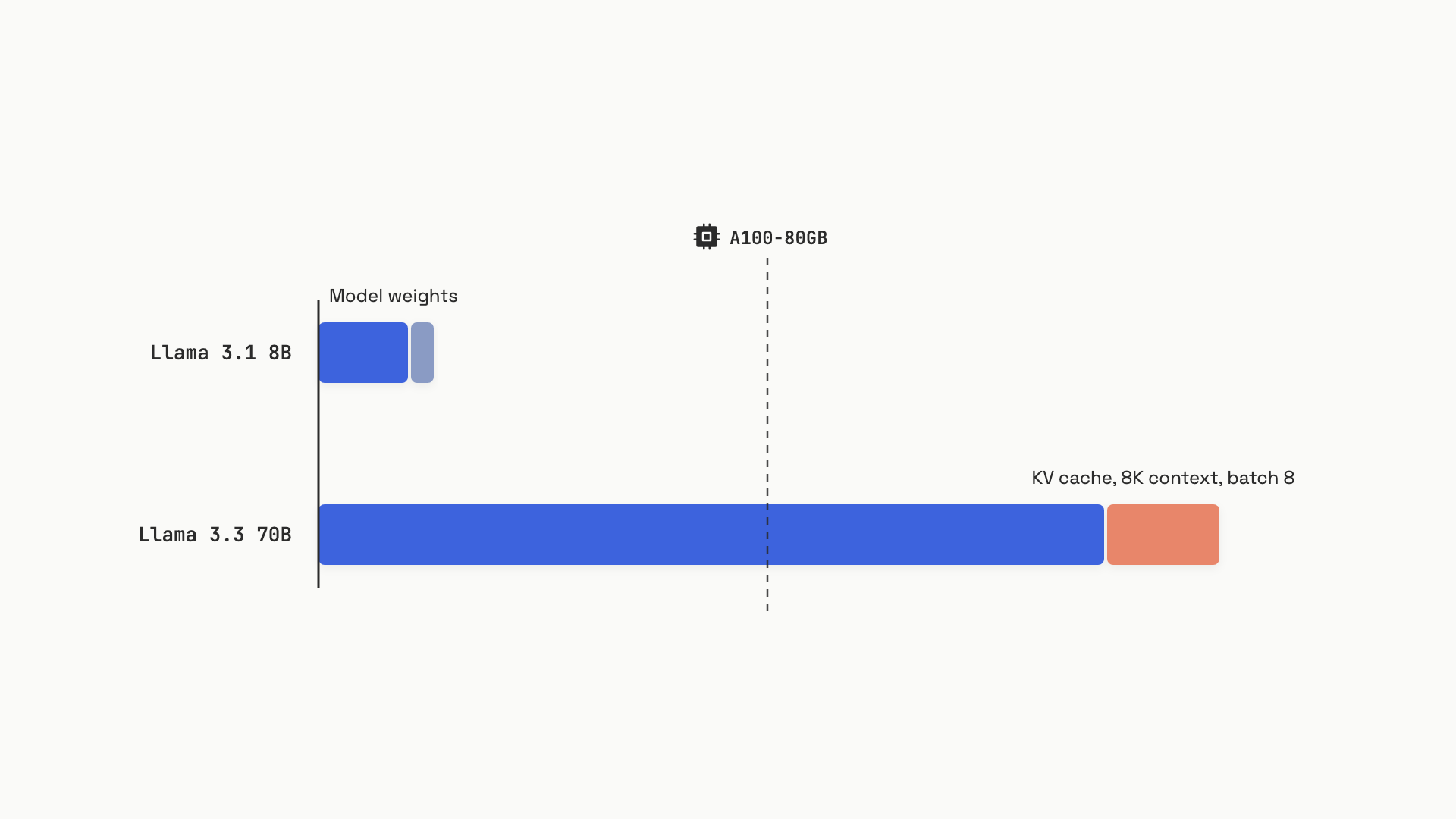 The KV cache grows linearly with context length and batch size. At 70B scale and moderate concurrency, the cache eclipses the weights.
The other thing the KV cache teaches: GQA is the architectural innovation that made 70B models practically deployable. Llama 3.x 70B uses 8 KV heads instead of the 64 query heads. Without GQA, the same 8K-context batch of 8 requests would need 164 GB of KV cache alone. That's why old MHA models capped out at much smaller scales.
You can pay rent on the cache in a few ways:
- Reduce
--max-model-len(cheapest, no quality cost, just shorter contexts) - Use
--kv-cache-dtype fp8_e5m2(halves cache memory; minimal quality impact on most workloads, slightly worse on math and code) - Quantize weights with
--quantization fp8(frees weight memory for more cache) - Add GPUs via
--tensor-parallel-size(the expensive one)
Continuous batching is the throughput trick#
The reason vLLM exists is a scheduling trick called continuous batching. The naive approach (static batching) groups N requests into a batch, runs them all together, and waits until the longest one finishes before accepting new requests. If one user wants a 2,000-token essay and seven want 50-token answers, the seven short users have their slots locked up for 1,950 extra decode steps doing nothing.
Continuous batching, introduced as iteration-level scheduling in the Orca paper at OSDI 2022, re-evaluates the active set on every decode step.[4] When a request hits its EOS token, its slot is freed immediately and a waiting request takes its place. No one waits for the longest request anymore.
The throughput numbers are not subtle. Orca measured 36.9x throughput improvement over FasterTransformer on GPT-3 175B at matched latency.[4:1] vLLM's original 2023 benchmarks showed 2-24x over HuggingFace Transformers depending on concurrency. At Stripe's scale, this translated to one-third the GPU fleet.[1:2]
In vLLM there's no flag to enable this. It's always on. The knob you actually tune is max_num_seqs, which caps the number of concurrent sequences in the running queue. Set it too high and the KV cache exhausts; vLLM starts evicting requests, forcing them to restart prefill from scratch when capacity returns, and your tail latency explodes. Set it too low and the GPU sits underutilized.
The right way to tune it: watch the vllm_gpu_cache_usage_perc Prometheus metric. If it stays below 70%, raise max_num_seqs. If it pegs at 90% with vllm_num_preempted_requests going up, lower max_num_seqs or add GPUs.
One more thing worth knowing: vLLM also supports chunked prefill, which slices long prompts into chunks so a single 32K-token prefill doesn't block all the decode requests for a full step. It's enabled by default in V1. You don't think about it until you see latency spikes correlated with long-prompt arrivals; then you bump long_prefill_token_threshold lower.
Sizing GPUs without a calculator#
Before you rent hardware, the back-of-envelope math takes ninety seconds. Three steps.
Step 1: weight memory. weight_GB = params_billions x bytes_per_param / TP, where bytes_per_param is 2 for BF16, 1 for FP8, 0.5 for INT4. Llama 3.3 70B in BF16 with TP=4 is 70 x 2 / 4 = 35 GB per GPU. Same model in FP8 with TP=2 is 70 x 1 / 2 = 35 GB per GPU.
Step 2: KV cache budget. What's left after weights and overhead. The vLLM memory layout under default settings:[5]
GPU total VRAM
  - Reserved budget = total x gpu_memory_utilization (default 0.9)
      - Model weights
      - Activations + NCCL buffers (~2-3 GB)
      - KV cache pool (everything else)
  - Unreserved 10%
      - CUDA graphs (1-5 GB)
So for a single 80 GB A100 hosting Llama 3.3 70B at TP=2: budget is 72 GB, weights are 35 GB, overhead is ~2 GB, KV pool is ~35 GB per GPU. Across two GPUs, that's 70 GB total cache pool. Plenty of room.
Step 3: target concurrency check. Use the formula from earlier:
def kv_cache_gb(num_layers, num_kv_heads, head_dim, max_seq_len, batch_size, dtype_bytes=2):
    """Exact KV cache memory in GB across the full batch."""
    total_bytes = (
        2 * num_layers * batch_size * max_seq_len * num_kv_heads * head_dim * dtype_bytes
    )
    return total_bytes / (1024 ** 3)

# Llama 3.3 70B: 80 layers, 8 kv_heads, 128 head_dim, batch=16, 8K tokens
kv_needed = kv_cache_gb(80, 8, 128, 8192, 16)
# 40 GB needed, ~70 GB available -> fits, with room to spare
If kv_needed exceeds your KV pool: lower --max-model-len, lower max_num_seqs, switch to FP8 KV cache, or add GPUs. There's no free lunch, but the order is: lower context first, FP8 cache second, more GPUs last.
The minimum GPU count for a model boils down to the smallest tensor parallelism size where weights and a reasonable KV pool fit on each card. Round up to a power of 2.
The pitfalls that bite first#
Six failure modes will bite you in your first month running vLLM. They all have well-known fixes; you just have to recognize them.
OOM at startup. Default context length is too high for available VRAM. Add --max-model-len 8192 (or lower). The error message often suggests a safe value.
Silent request preemption. Throughput looks fine but p99 latency is awful. The KV cache pool is exhausted and vLLM is evicting requests mid-flight. Watch vllm_num_preempted_requests. If non-zero, lower max_num_seqs or add capacity.
Tensor parallel over PCIe. Your TP=4 deployment is somehow slower than a single GPU. Tensor parallelism does an all-reduce on every forward pass. NVLink delivers ~600 GB/s; PCIe Gen4 delivers ~64 GB/s. The all-reduce alone can eat 20-40% of step time on PCIe. Use NVLink-connected GPUs, or switch to pipeline parallelism if you can't.
Cold first-request latency. First request after startup takes 60x longer than subsequent ones. CUDA graphs are warming up and weights aren't in L2 cache yet. Send a few warmup requests in your health check before the load balancer routes traffic to a new instance.
Context window mismatch. User sends 16K tokens, gets a 400 error. The model's config.json says max_position_embeddings=4096 even though RoPE scaling supports more. Set --max-model-len explicitly to a length you've actually tested.
TGI is dead. HuggingFace put Text Generation Inference in maintenance mode on December 11, 2025. Don't start a new deployment on it. vLLM for general workloads, SGLang for prefix-heavy RAG and structured outputs.
That's the operations menu. The next chapter is the customization menu (fine-tuning, LoRA, distillation), and after that comes Cost engineering, where every knob in this chapter shows up again as a lever on your monthly bill.
References#
Introl, "vLLM Production Deployment", December 2025, https://introl.com/blog/vllm-production-deployment-inference-serving-architecture ↩︎ ↩︎ ↩︎
vLLM, "Quickstart", official documentation, June 2026, https://docs.vllm.ai/en/latest/getting_started/quickstart/ ↩︎
Michael Brenndoerfer, "KV Cache Memory: Calculating GPU Requirements for LLM Inference", January 2026, https://mbrenndoerfer.com/writing/kv-cache-memory-calculation-llm-inference-gpu ↩︎
Gyeong-In Yu et al., "Orca: A Distributed Serving System for Transformer-Based Generative Models", USENIX OSDI 2022, https://www.usenix.org/conference/osdi22/presentation/yu ↩︎ ↩︎
NVIDIA, "Troubleshooting GPU Memory Out-of-Memory Errors", NVIDIA NIM for LLMs v2.0.5 docs, June 2026, https://docs.nvidia.com/nim/large-language-models/2.0.5/troubleshooting/memory.html ↩︎