
Prompt caching
The single biggest cost lever in API-native LLM products. A 50k-token agent over 10 turns drops from $1.53 to $0.47 with one config change.
A 10-turn conversation with a 45,000-token system prompt costs you $1.53 on Claude Sonnet 4.6. The same conversation, with one line of config changed, costs $0.47. That's 69% off the bill, on every single agent session, for as long as the product runs.[1] Most teams don't flip the switch. Some don't know it exists; others assume it requires Redis and a weekend. It doesn't. On OpenAI it's literally zero code. On Anthropic and Gemini it's a handful of lines.
This is the chapter on the largest cost lever in API-native LLM products, and why almost nobody is using it.
Why your bill is mostly the same tokens, over and over#
Every LLM API call is stateless. The provider takes your prompt, runs it through the model from token zero, and bills you for every input token it processed. Send the same 45,000-token system prompt ten times, and you pay for 450,000 input tokens, even though 449,955 of them are bit-for-bit identical to last call.
Inside the GPU, processing those tokens produces a stack of attention tensors called the KV cache (the key and value matrices the model uses to attend back to earlier tokens). Without prompt caching, the provider throws those tensors away the moment your response finishes. Next request: rebuild from scratch. You pay full price for compute that already happened.
Prompt caching is the provider keeping that KV cache around. On a second request that begins with the same prefix, the provider skips the prefill and bills the cached tokens at a fraction of the base input price: roughly 10% on Anthropic and OpenAI, 25% on Gemini. Same model, same output, same answer. Up to 90% off the input portion of the bill, and faster too, because prefill is where most of the time-to-first-token goes on long prompts.[1:1][2][3]
The worked math: 10 turns, $1.06 saved#
Here's the canonical agent shape: a 45,000-token system prompt (tools, instructions, retrieved documents) followed by a conversation that grows by about 1,000 tokens per turn. Run that for 10 turns on Claude Sonnet 4.6 at June 2026 prices ($3.00 per million input, $0.30 per million cached read, $3.75 per million cache write):
BASE  = 3.00  / 1_000_000   # $3.00/MTok base input
WRITE = 3.75  / 1_000_000   # 1.25x base, written once on the first miss
READ  = 0.30  / 1_000_000   # 0.10x base, every cache hit thereafter
OUT   = 15.00 / 1_000_000

STABLE = 45_000   # system prompt + tools + RAG context
TURN   = 1_000    # tokens added per user-assistant exchange
TURNS  = 10

no_cache = sum(
    (STABLE + (t-1)*TURN + 500) * BASE + 200 * OUT
    for t in range(1, TURNS + 1)
)
with_cache = sum(
    (STABLE * WRITE + 500 * BASE + 200 * OUT) if t == 1
    else (STABLE * READ + (t-1)*TURN * BASE + 500 * BASE + 200 * OUT)
    for t in range(1, TURNS + 1)
)
print(f"No cache:   ${no_cache:.4f}")   # $1.5300
print(f"With cache: ${with_cache:.4f}") # $0.4703
print(f"Savings:    {(1 - with_cache/no_cache)*100:.1f}%")  # 69.3%
A buck saved on one session sounds small. It isn't. A product with 10,000 daily active users running one of these conversations a day is $10,600 per day, $3.9M per year, in input tokens you're already paying for and didn't have to. Multiply that by every prompt-heavy feature you ship. This is why prompt caching is the lever.
The shape of the savings matters as much as the size. The first turn pays a small surcharge (cache writes cost 1.25x base on Anthropic's 5-minute tier, 2.0x on the 1-hour tier).[1:2] Every turn after that pays 10% on the stable prefix. The break-even is two requests inside the TTL window. If your traffic is bursty enough that a typical prefix gets reused at least once before it expires, caching is a strict win.
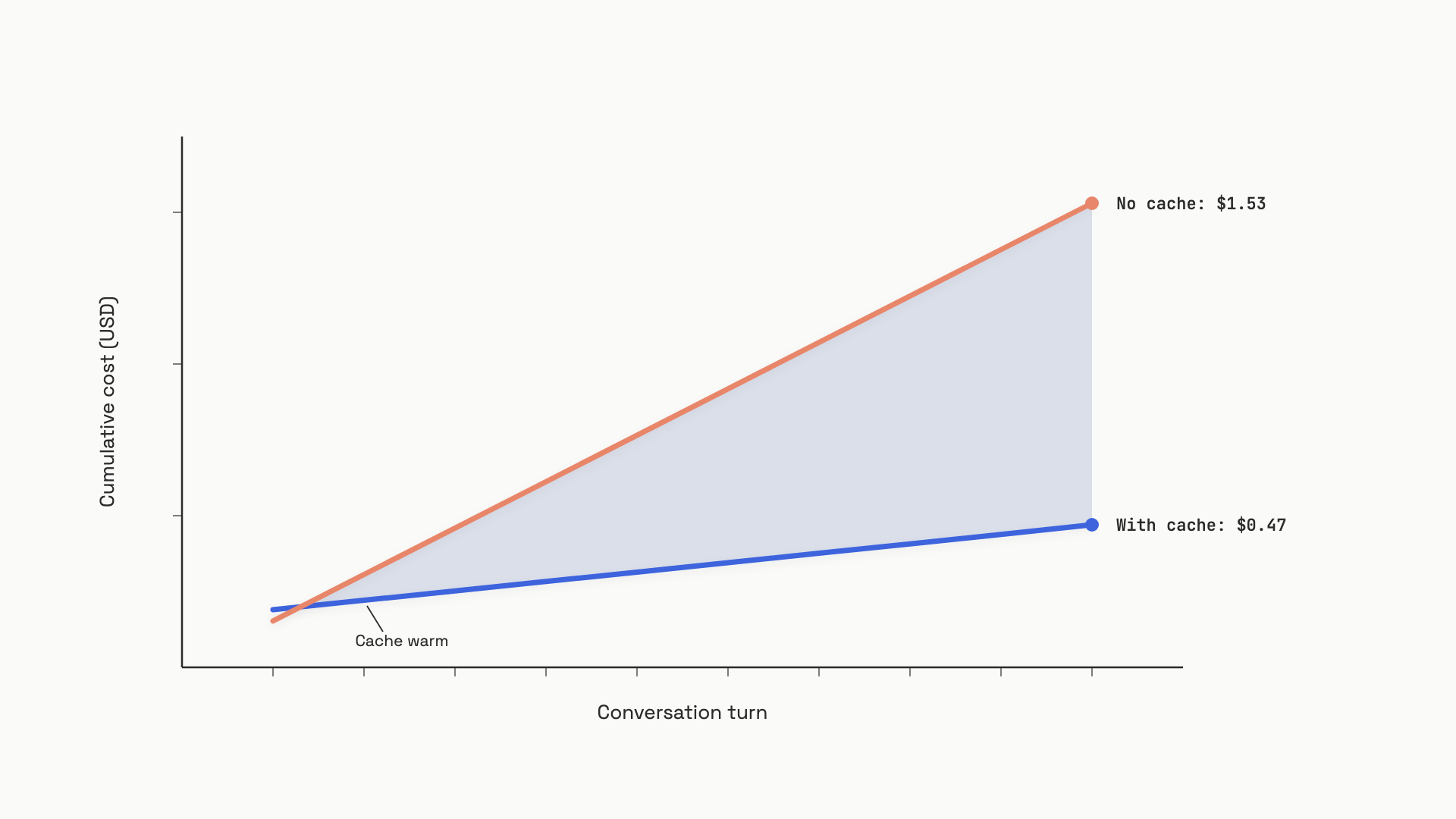 Cumulative cost over 10 turns. The gap between the two lines is what prompt caching is worth, and it widens with every additional turn.
The one rule of prefix design: stable first, variable last#
Caching only works when the start of your prompt is bit-for-bit identical across requests. The provider hashes the prefix; one byte different, full miss. So the rule is universal across Anthropic, OpenAI, and Gemini: arrange your prompt with the most stable content at the top and the most variable content at the bottom.
The canonical order, top to bottom:
- Tool definitions. Almost never change across a deployment.
- System instructions. Change per deployment, not per request.
- Background documents and RAG context. Change when content changes.
- Conversation history. Grows per turn; older turns become stable.
- Current user message. New every request, always at the bottom.
The single most common mistake is putting a per-request value (a timestamp, a session ID, the current date, the user's name) at the top of the system prompt. That one variable invalidates the hash on every request and you get a 100% miss rate. You'll see it in the response usage fields immediately: cache_creation_input_tokens is non-zero on every call and cache_read_input_tokens is always zero. If you can't move the variable to the end, drop it from the prompt entirely and pass it through a tool call instead.
For a worked example: a system prompt that opens with Today is {date}. followed by 40,000 tokens of stable instructions caches nothing. The same prompt with Today is {date}. moved to the user message instead caches the full 40,000 tokens. Same information reaches the model. Different bill by an order of magnitude.
Three providers, three philosophies#
The mechanism is the same; the API surface isn't. Each provider made a different bet on developer control versus simplicity, and the bet shows up in your code.
OpenAI: automatic, zero code#
OpenAI does prompt caching automatically on any request over 1,024 tokens. There's no cache_control field and no breakpoint to set. The provider hashes a prefix of your request (typically the first 256 tokens), routes you to a server that's seen that prefix before, and serves the cached KV tensors at 10% of the base input price. Your only job is to put stable content first.[2:1][4]
You can confirm a hit by reading usage.prompt_tokens_details.cached_tokens on the response. For high-throughput services sending the same long prefix from many requests in parallel, the prompt_cache_key parameter helps the router send same-prefix requests to the same machine; without it, bursts above ~15 requests per minute per prefix overflow to other machines and miss the cache.[2:2]
Default TTL is 5 to 10 minutes of inactivity, capped at one hour. Recent flagship models (gpt-5.5, gpt-5.4, gpt-4.1 among others) support an extended 24-hour mode that offloads the KV tensors to GPU-local storage when memory is full. For chat products with sub-minute reuse cadence, default is fine. For cron-driven batch jobs that hit the same prefix every hour, request the extended mode.[2:3]
Anthropic: explicit breakpoints, four slots#
Anthropic gives you direct control. You mark up to four positions in your prompt with a cache_control field, and the provider stores the KV tensors of the prefix up to each marked block. Subsequent requests with the same prefix read from the cache:
import anthropic

client = anthropic.Anthropic()
SYSTEM_PROMPT = "... 45k tokens of stable documentation ..."

response = client.messages.create(
    model="claude-sonnet-4-6",
    max_tokens=1024,
    system=[{
        "type": "text",
        "text": SYSTEM_PROMPT,
        "cache_control": {"type": "ephemeral"},  # 5-min TTL; use "ttl": "1h" for 1-hour
    }],
    messages=[{"role": "user", "content": "What does section 4 say?"}],
)
u = response.usage
print(u.cache_read_input_tokens, u.cache_creation_input_tokens, u.input_tokens)
Two TTL options: 5 minutes (writes cost 1.25x base, reads cost 0.10x) or 1 hour (writes 2.0x, reads 0.10x). Pick 1-hour when users may return after a coffee break; pick 5-minute for tight bursts.[1:3]
The control comes with two failure modes worth knowing. First, the lookback window: each breakpoint can only find a cached entry within 20 message blocks of itself. A conversation that grows past 20 turns will silently start missing the cache unless you also place a breakpoint at the end of your stable system prompt, which always fires. Second, anything inside the cached prefix has to be byte-identical: changing an image, toggling tool_choice, or modifying tool definitions invalidates the cache.[1:4]
A useful pre-warm trick: send a single request at app startup with max_tokens=1 to populate the cache before any user traffic arrives (the Messages API requires at least 1 output token). The API processes the prefix, writes the cache, and bills you one output token for the privilege.[1:5]
Gemini: explicit named cache resource#
Gemini takes a third path. You create a server-side cache resource with client.caches.create(), get back a name, and reference that name in subsequent generate_content calls:
from google import genai
from google.genai import types

client = genai.Client()
cache = client.caches.create(
    model="models/gemini-2.5-pro",
    config=types.CreateCachedContentConfig(
        display_name="doc_cache",
        contents=[types.Content(role="user", parts=[types.Part(text=DOCUMENT)])],
        ttl="3600s",  # default 1h; updateable later
    ),
)

response = client.models.generate_content(
    model="models/gemini-2.5-pro",
    contents="Summarize section 4.",
    config=types.GenerateContentConfig(cached_content=cache.name),
)
This shape suits a different workload: one large stable corpus (a 10-minute video, a 500-page PDF, a full codebase) queried many times across hours or days. TTL is configurable up to whatever you want; Anthropic's max is one hour. The trade-off is a per-token-per-hour storage fee on top of the read price, and Gemini's cached reads cost 25% of base input, not the 10% Anthropic and OpenAI charge. On Gemini 2.5 Pro at $4.50 per million tokens per hour, caching 100k tokens for 24 hours costs $10.80 in storage; at $0.94 saved per million cached input tokens read, you need ~115 queries against that cache in those 24 hours to break even.[3:1][5] Below that query rate, caching costs more than not caching. Gemini 2.5 and newer also enable implicit caching automatically (no resource needed), but with no hit guarantee.
When to default to which#
The decision comes down to where you already are and what you're caching:
- You're on OpenAI. Already done. Verify static content is at the top of the prompt, check
cached_tokensin your logs, ship. - You're on Anthropic with a long system prompt or multi-turn agent. Place one explicit breakpoint at the end of your stable system prompt, use the 5-minute TTL by default, switch to 1-hour for sessions where users routinely pause more than five minutes.
- You're caching a large stable corpus on Gemini, queried in batch. Use explicit named caches and check the break-even math first.
- Your prompt is under 1,024 tokens, or every request has a unique prefix. Don't cache. Below the minimum, providers process normally; with no shared prefix, there's nothing to share.
The most common reason teams skip caching is the assumption that it's hard. It isn't. On OpenAI you're paying full price right now for caching that's already running. On Anthropic, one field on one content block is the entire integration. The hard part is the prefix discipline, and that's a one-time review of where your variables sit.
For the bigger cost picture (the cost-quality-latency triangle and the other levers besides caching), The cost, quality, latency triangle sets the framing this chapter sits inside. When caching alone isn't enough, Cost engineering stacks it with batching, routing, quantization, and distillation.
References#
Anthropic, "Prompt caching", Anthropic API Docs, https://docs.anthropic.com/en/docs/build-with-claude/prompt-caching (fetched June 12 2026) ↩︎ ↩︎ ↩︎ ↩︎ ↩︎ ↩︎
OpenAI, "Prompt caching", OpenAI API Docs, https://platform.openai.com/docs/guides/prompt-caching (fetched June 12 2026) ↩︎ ↩︎ ↩︎ ↩︎
Google, "Context caching", Gemini API Docs, https://ai.google.dev/gemini-api/docs/caching (fetched June 12 2026) ↩︎ ↩︎
OpenAI, "Pricing", OpenAI API Docs, https://platform.openai.com/docs/pricing (fetched June 12 2026) ↩︎
Google, "Gemini Developer API pricing", https://ai.google.dev/gemini-api/docs/pricing (fetched June 12 2026) ↩︎