
Streaming
How token-by-token streaming wins on perceived latency, why it breaks output validation, and the four ways to get both.
A non-streamed request to GPT-5.5 returns a 500-token reply in roughly six seconds. The user sits and stares at a spinner the whole time. Stream the same call and the first words land on screen in about a second; the rest scroll out as the model writes them.[1] That single change is the difference between an app that feels alive and one that feels broken, and it costs you nothing on the model side.
It costs you something else though, and that's the part most tutorials skip. Once tokens start flowing to the user, you've lost your chance to look at the full response before they see it. Schema checks, moderation passes, semantic guardrails, anything that needs the complete answer to do its job, all of it now runs after the user has already read what came back. That tension is the whole chapter.
What's actually on the wire#
The transport is Server-Sent Events, a plain-HTTP protocol the browser has spoken since the 2000s.[2] You open one HTTP connection, the server holds it open, and it writes lines like data: {...}\n\n as the model produces tokens. The client reads those lines as they arrive. The connection closes when generation finishes.
You almost never deal with the raw bytes. The provider SDK hides the parsing and hands you a Python iterator of typed events. Here's the OpenAI version:
import os
from openai import OpenAI

client = OpenAI(api_key=os.environ["OPENAI_API_KEY"])

def stream_reply(prompt: str) -> str:
    full = ""
    stream = client.chat.completions.create(
        model="gpt-5.5",
        messages=[{"role": "user", "content": prompt}],
        stream=True,
    )
    for chunk in stream:
        delta = chunk.choices[0].delta
        if delta.content is not None:
            print(delta.content, end="", flush=True)  # render here
            full += delta.content
    return full
Three things are worth knowing about that loop. The first chunk carries the role ("assistant") but no text, so delta.content is None; skip it. The middle chunks each carry a small string, usually a few tokens. The last chunk is empty and carries finish_reason. The OpenAI SDK terminates the iterator at the data: [DONE] sentinel.[3]
Anthropic's wire is richer. Each event has a typed name on its own line, so you switch on the event type:
import os, anthropic

client = anthropic.Anthropic(api_key=os.environ["ANTHROPIC_API_KEY"])

def stream_claude(prompt: str) -> str:
    full = ""
    with client.messages.stream(
        model="claude-opus-4-8",
        max_tokens=1024,
        messages=[{"role": "user", "content": prompt}],
    ) as stream:
        for event in stream:
            if event.type == "content_block_delta" and event.delta.type == "text_delta":
                full += event.delta.text
            elif event.type == "message_delta" and event.delta.stop_reason == "refusal":
                raise RuntimeError("streaming refusal; reset conversation context")
    return full
The message_delta check there isn't decoration. Anthropic added it for a 2026 failure mode that I'll come back to in a minute.[4]
Why streaming feels so much faster#
The metric users feel is time-to-first-token (TTFT), the gap from sending the request to seeing any output. It's a different number from total generation time, and it dominates perceived latency.[1:1]
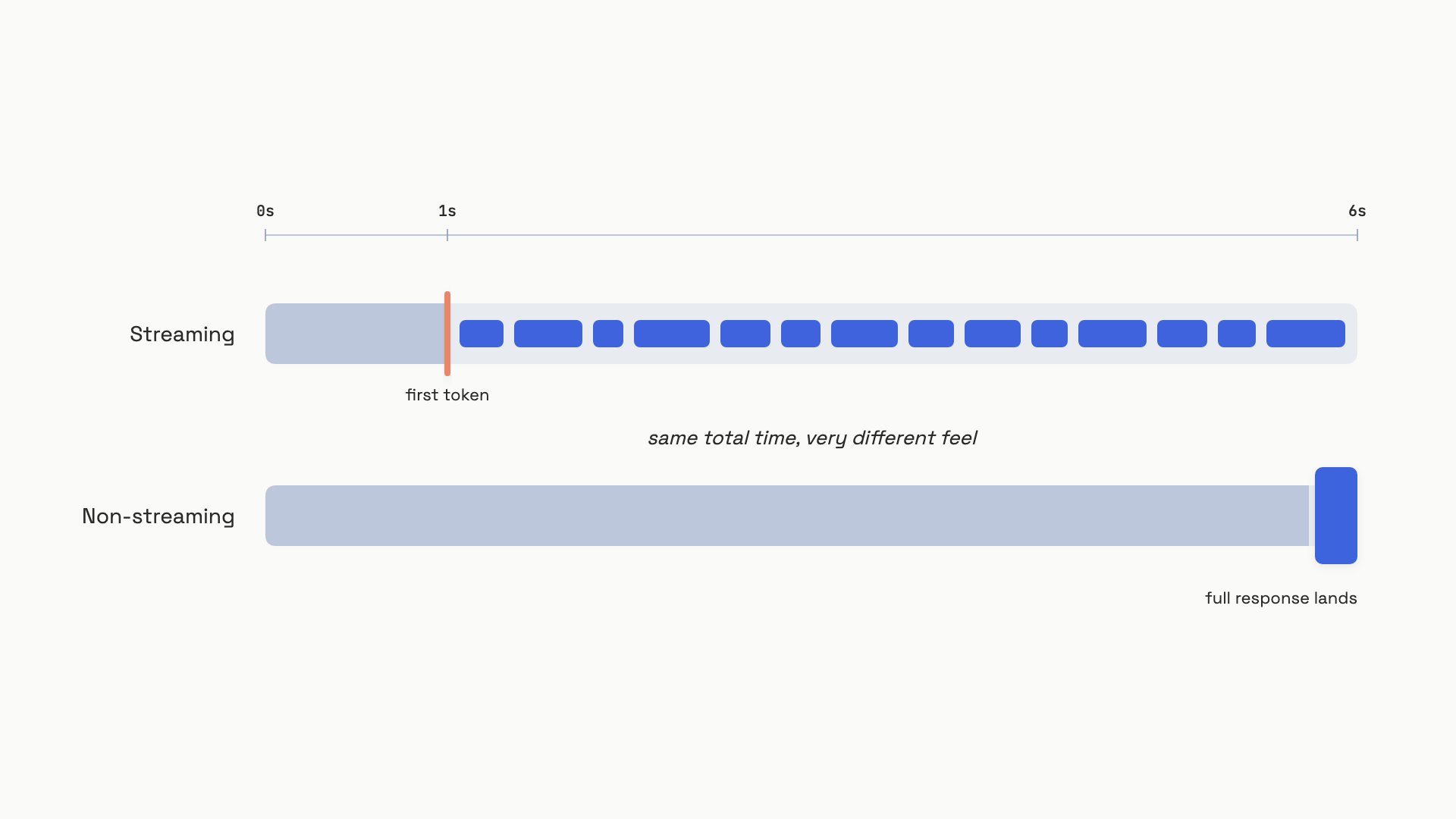 Streaming pays the same total generation cost, but the user sees output starting at TTFT instead of at the end.
The numbers move with the model and the provider. As of April 2026, Claude Sonnet 4.6 hits TTFT P50 around 0.74 seconds; GPT-5.5 standard sits at 1.12 seconds; specialized inference hardware like Groq's LPU gets Llama 4 down to 0.18 seconds.[1:2] Reasoning modes are a different planet. Claude Opus 4.7 in extended thinking has P50 TTFT of 28 seconds. GPT-5.5 Pro at high reasoning_effort reaches 67 seconds.[1:3] Once TTFT crosses about 5 seconds, streaming stops helping perceived responsiveness, because the user has already given up on the spinner. For reasoning modes, show a loading state, not a streaming display.
The catch: streaming blocks validation#
Here's where streaming stops being a free win. JSON schema validation, content moderation, semantic guardrails, and "is this answer grounded in the retrieved documents" classifiers all need one thing: the complete output. Every intermediate state of a streamed JSON object is, by definition, syntactically invalid.[5] You cannot run json.loads on {"name": "Al. You cannot ask a moderation classifier whether half a sentence is harmful, because half a sentence isn't a sentence yet.
OpenAI says this directly in their docs: streaming "makes it more difficult to moderate the content of the completions, as partial completions may be more difficult to evaluate," and moderation scores "arrive after the full generated output is available. They aren't included with partial output deltas."[3:1]
So you have a fork. If you want users to see the response as it generates, you can't validate it before they see it. If you want to validate before they see it, you can't show it as it generates. Pick.
Four ways out#
Stream and validate after. Render tokens to the UI as they arrive, but never act on them. Buffer the full response, parse it once the stream closes, and only then pass it to anything downstream. If validation fails, replace the visible text with an error or a "let me try that again" retry. This is the right default for chat: the user is the consumer, the content is human-readable, and a brief flash of half-rendered output is recoverable.
import json, os
from openai import OpenAI

client = OpenAI(api_key=os.environ["OPENAI_API_KEY"])

def stream_then_validate(prompt: str, required: list[str]) -> dict:
    buffer = ""
    stream = client.chat.completions.create(
        model="gpt-5.5",
        messages=[
            {"role": "system", "content": "Respond with valid JSON only."},
            {"role": "user", "content": prompt},
        ],
        response_format={"type": "json_object"},
        stream=True,
    )
    for chunk in stream:
        delta = chunk.choices[0].delta
        if delta.content is not None:
            buffer += delta.content
            # render to UI here, do not parse

    parsed = json.loads(buffer)         # parse only after stream closes
    for key in required:
        if key not in parsed:
            raise ValueError(f"missing field: {key}")
    return parsed
The line that matters is the blank one. UI rendering happens inside the loop; parsing and validation happen after. Code that calls json.loads(buffer) inside the loop will throw on every chunk except the last, and any team that "fixes" that with a partial-JSON parser is one provider quirk away from a production incident.
Don't stream; animate instead. Make a normal blocking call. Wait for the full response. Validate it. Then render it on the client with a typewriter effect that looks like streaming. The user feels the same UX; you keep the validation guarantee. The cost is honesty about the wait: total blank-screen time is now TTFT plus full generation time, not just TTFT. For a 500-token response, that's six seconds of spinner before anything appears. Use this when the output controls something downstream and a brief flash of bad content is unacceptable, or when the response is short enough that the wait is small.
Use the provider's structured outputs with streaming. OpenAI's Structured Outputs (gpt-4o-2024-08-06 and later) and Anthropic's equivalent (added late 2025) bake the schema into the decoder itself. The provider masks invalid tokens at every generation step, so the completed output is guaranteed to satisfy the schema. With stream=True, the provider's SDK helper exposes a parsed object that fills in field by field as each JSON value completes. You get streaming UX and a schema guarantee. OpenAI reports 100% schema compliance on their own evals, against under 40% for the older function-calling pattern on complex schemas.[6] What you don't get is partial validation: parsed.address is None until that whole field has streamed, then it appears.
Guardrail the input, not the output. Run a fast classifier on the user's prompt before opening the stream. Refuse adversarial inputs up front. This catches most jailbreak attempts cheaply, but it does nothing about hallucinations on benign inputs, so it pairs with one of the other three strategies; it doesn't replace them.
Streaming refusals: the 2026 gotcha#
Claude 4 and later models added a feature you have to handle explicitly. A safety classifier runs alongside generation. If it fires mid-stream, generation stops and the API returns stop_reason: "refusal" in a message_delta event.[4:1] No explanation text comes with it. The tokens already streamed have already reached the user.
If your code doesn't check for this, here's what your user sees: a response starts, writes 50 tokens, and then... stops. Mid-sentence. No error, no message. Looks like a network blip, but it's actually a content policy decision the model made halfway through.
Two things to do. Check event.delta.stop_reason == "refusal" on every message_delta (the loop above does this). And reset the conversation context before retrying, because Anthropic's docs are explicit: continuing the same context after a streaming refusal causes the next response to refuse too.[4:2] One more bit of housekeeping: those 50 tokens cost money. The usage field on the message_delta event reports the actual billed tokens even on refused responses.[4:3]
A passthrough proxy with a 30-second idle timeout will kill your reasoning-model streams. Reasoning models can take 30 to 60 seconds before the first token appears, and to a load balancer that looks like an idle connection. The fix is a longer read timeout (120s minimum for reasoning tiers) on every hop between client and provider, plus keep-alive pings during the thinking phase if your provider supports them.
The decision rule#
Walk this in order before you reach for stream=True:
- Where does the output go? If it goes to a human's eyes and nowhere else, stream by default. If it goes to code, a database, a tool call, or another LLM, don't stream the part that drives the action; either don't stream at all, or stream for display while validating the buffered copy.
- Does moderation have to run before display? Medical, financial, child safety, regulated content: don't stream. Use the animated-display pattern.
- Is the model in reasoning mode? Don't stream to the UI. Show a loading state. The first token won't arrive for tens of seconds, and a streaming display that starts after a 30-second blank screen is worse than an honest spinner.
- Need both streaming and a schema? Use the provider's structured outputs with
stream=True. Accept that field-level validation only happens after each field's JSON value completes; you don't get character-level validity.
Streaming is the right default for chat. It's the wrong default for anything where bytes drive behavior. The line between those two cases is where most of the bugs in this chapter come from.
References#
Digital Applied Team, "AI Model Latency Benchmarks 2026: TTFT and TPS Data," Digital Applied, April 23, 2026. https://www.digitalapplied.com/blog/ai-model-latency-benchmarks-2026-ttft-throughput ↩︎ ↩︎ ↩︎ ↩︎
WHATWG, "HTML Living Standard, Section 9.2: Server-sent events," Living Standard (last updated June 1, 2026). https://html.spec.whatwg.org/multipage/server-sent-events.html ↩︎
OpenAI, "Streaming API responses," OpenAI Platform Docs, accessed June 2026. https://platform.openai.com/docs/guides/streaming-responses ↩︎ ↩︎
Anthropic, "Streaming refusals," Anthropic Developer Docs, accessed June 2026. https://docs.anthropic.com/en/test-and-evaluate/strengthen-guardrails/handle-streaming-refusals ↩︎ ↩︎ ↩︎ ↩︎
Qwen3Guard team, "Qwen3Guard Technical Report," arXiv:2510.14276, October 2025. https://arxiv.org/html/2510.14276v1 ↩︎
OpenAI, "Structured model outputs," OpenAI Platform Docs, accessed June 2026; "Introducing Structured Outputs in the API," OpenAI blog, August 6, 2024. https://platform.openai.com/docs/guides/structured-outputs ↩︎